Skip to content

Category: WordPress AI

  • Building an AI-Native Company Website on WordPress in 2026

    Building an AI-Native Company Website on WordPress in 2026

    An AI-native company website is built from the ground up to be visible, citable, and useful to AI systems. These include ChatGPT, Gemini, Perplexity, and Claude. It still delivers a great experience for human visitors. If your company website only targets Google rankings, you are building for yesterday. The businesses that win in 2026 are the ones AI platforms choose to cite, recommend, and trust.

    I have been building WordPress websites since 2014. Over those 12 years, I have watched every major shift in how people find businesses online. None of them compares to what is happening right now. AI systems are replacing the search results page with direct answers. Your website is either part of those answers, or it does not exist.

    This guide covers what makes a company website AI-native. It explains why it matters for your bottom line. And it shows exactly how to build one on WordPress 7.0.

    What Does AI-Native Actually Mean for a Company Website?

    An AI-native company website is designed for two audiences at the same time. Your human visitors. And the AI systems that now shape how those visitors find you. Every decision about content structure, HTML markup, and technical setup accounts for both.

    Traditional websites are built for one goal: rank on Google, get clicks. An AI-native website goes further. AI crawlers from OpenAI, Anthropic, Google, and Perplexity can read your content. They can extract it. They can cite it accurately. Your company description shows up inside ChatGPT’s answer. Your service page gets cited in a Perplexity response. Your team’s expertise feeds into Google’s AI Overviews.

    Here is the key difference. A traditional website says, “Visit our site to learn more.” An AI-native website makes the answer available where users already are inside the AI response itself.
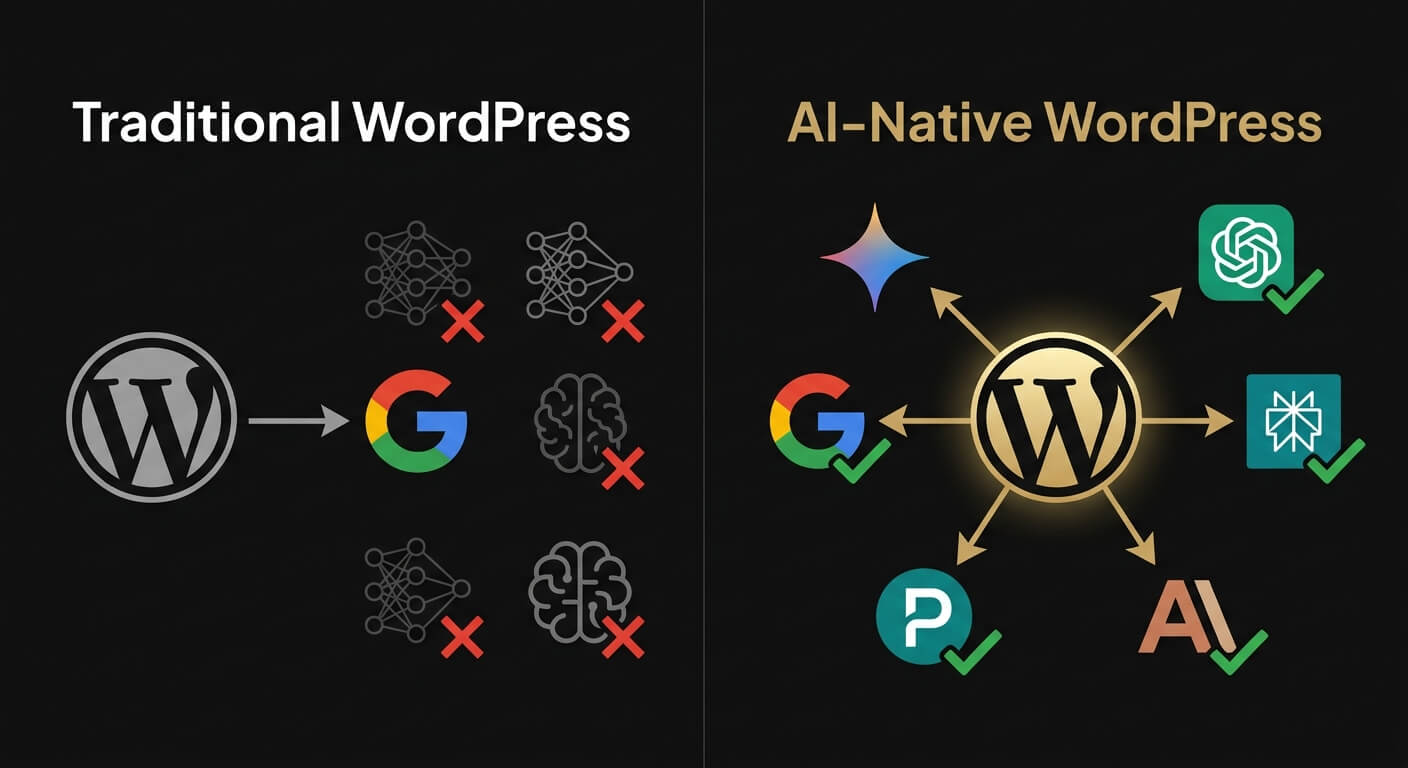
    Comparison between traditional website optimized only for Google versus AI-native website optimized for multiple AI discovery platforms
    FeatureTraditional WebsiteAI-Native Website
    Target audienceHuman visitors onlyHumans AND AI systems
    Discovery modelGoogle organic rankingsGoogle + ChatGPT + Gemini + Perplexity + Claude
    Content formatLong-form, keyword-optimizedPassage-level, answer-first, self-contained sections
    Structured dataBasic or noneComprehensive JSON-LD (Organization, Person, Service, FAQ)
    AI crawler accessNot configuredExplicitly allowed (GPTBot, ClaudeBot, PerplexityBot)
    RenderingOften JavaScript-dependentServer-side rendered HTML
    Success metricTraffic and rankingsCitations, mentions, and AI Share of Voice

    Why Every Company Website Needs to Be AI-Native Right Now

    The numbers are clear. This is not a future trend. It is already happening.

    Gartner projects a 25% decline in traditional search engine volume by 2026. Generative AI is expected to power 70% of all search traffic by 2028. SparkToro and Datos research paints a stark picture. 58.5% of all U.S. Google searches in 2024 ended without a click to an external website. For every 1,000 searches, only 360 clicks reach the open web.

    The conversion data makes the case even stronger. Semrush found that AI platform visitors convert at 4.4 times the rate of organic search visitors. Seer Interactive’s B2B client analysis showed ChatGPT referrals converting at 15.9%. Google organic sat at 1.76%. That is a 9x difference.

    Think about what this means. A procurement manager asks ChatGPT, “What are the best WordPress agencies in Southeast Asia?” A CEO asks Gemini, “Which companies offer AI integration consulting?” Your company website needs to be in those answers. Not on page two of Google. Inside the AI response.

    Companies with AI-native websites appear in those answers. Companies without them do not.

    The Building Blocks of an AI-Native Company Website

    Building an AI-native website is not about adding a chatbot or installing an AI plugin. It is about making architectural decisions that affect how your entire site communicates with machines. Here are the five core building blocks.
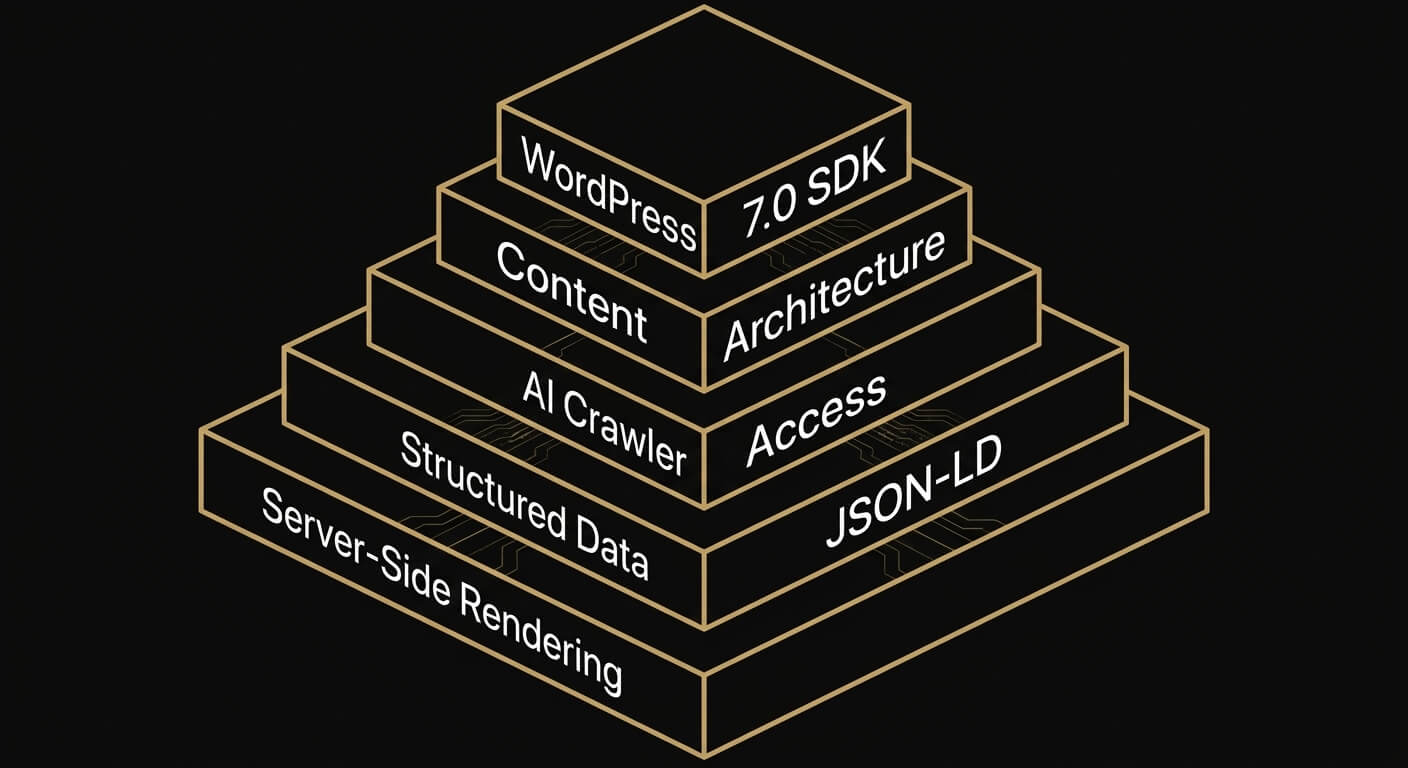
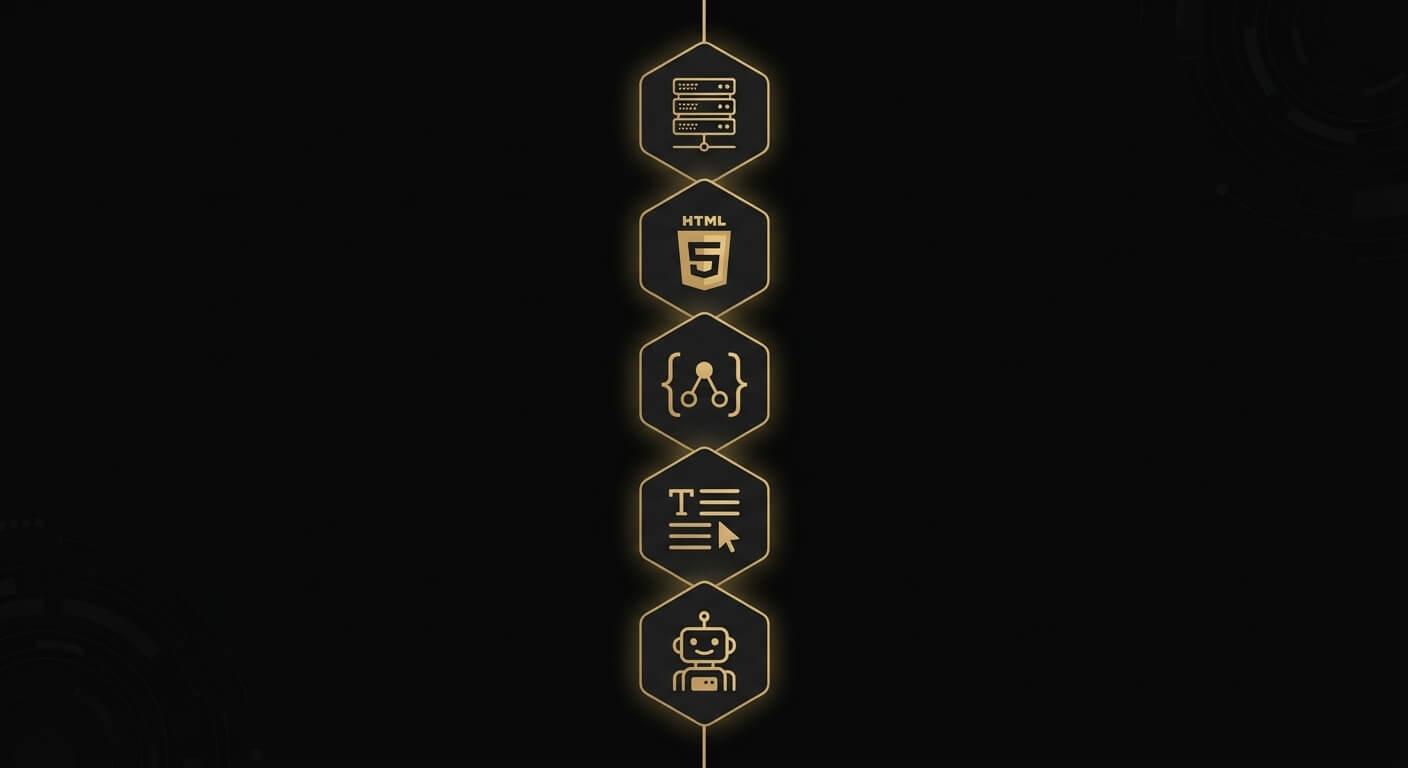
    Five building blocks of an AI-native company website: server-side rendering, structured data, AI crawler access, content architecture, and WordPress 7.0 AI Client SDK

    Content Architecture: Answer-First, Self-Contained

    AI systems do not read web pages the way humans do. Large language models extract passage-level chunks of roughly 200 to 500 tokens. Each chunk needs to stand on its own.

    Here is what this means in practice. Every section on your website should start with a direct answer. Put it in the first 40 to 60 words. Your About page should answer “Who is this company?” in the opening sentence. Your service pages should define the service before explaining it.

    The Princeton GEO research paper tested 10,000 queries across AI platforms. It was published at ACM KDD 2024. Content with clear Q&A formatting is 40% more likely to be cited by AI systems. Adding statistics improved AI visibility by 22%. Adding citations to credible sources boosted it by 115% for mid-ranked sites.

    I have built dozens of WordPress sites over the years. This is the biggest content architecture change since mobile-first design. Every paragraph must be readable without context. No dangling pronouns. No “as mentioned above.” Each block is a potential AI citation.

    Technical Foundation: Structured Data and Clean HTML

    JSON-LD structured data is not optional. It is how your website communicates with Google’s Knowledge Graph in machine-readable format.

    For a company website, you need these schema types at a minimum. Organization with sameAs links to LinkedIn, directories, and social profiles. Person for key leadership. Service for each offering. Article for blog posts. FAQ page for frequently asked questions. Schema App’s research found a 19.72% increase in Google AI Overview visibility. The gain came after implementing entity-linking through structured data.

    Your HTML matters too. Semantic HTML5 elements like <article>, <main>, <section>, and <time> give AI systems structural context. Generic <div> layouts cannot provide this. Keep your markup clean. Pages loading under 2 seconds get crawled 5 times more frequently by AI crawlers.

    AI Crawler Access: Open the Door

    Here is something most web agencies miss completely. GPTBot, ClaudeBot, and PerplexityBot cannot execute JavaScript. If your website uses a JavaScript-heavy theme or page builder that renders content client-side, AI crawlers see a blank page. A ZipTie.dev audit of over 500 websites confirmed that sites relying on client-side rendering are invisible to major AI crawlers.

    Your robots.txt file must explicitly allow AI crawlers. The list includes GPTBot, OAI-SearchBot, ClaudeBot, Claude-SearchBot, PerplexityBot, and Google-Extended. Add an llms.txt file at your domain root that describes your site for AI systems. Activate IndexNow protocol for instant indexing notification to Bing. Bing powers ChatGPT’s search. Sites with properly configured AI crawler access see citations appear 3 to 4 weeks faster.

    Server-side rendering is not a nice-to-have. It is the minimum requirement for AI visibility.

    Entity Optimization: Be Recognizable

    AI systems understand businesses through entities, not keywords. Your company is an entity. Your founder is an entity. Your services are entities. The relationships between them matter.

    Research from The Digital Bloom found that brand search volume is the strongest predictor of LLM citations. The correlation is 0.334. That is stronger than backlinks or domain authority. Sites present on 4 or more platforms are 2.8 times more likely to appear in ChatGPT responses.

    Your company name, description, and positioning must be consistent everywhere. Your website. Your LinkedIn company page. Google Business Profile. Clutch. GoodFirms. Every directory where you appear. AI systems cross-reference these signals. Inconsistency creates confusion. Consistency builds trust.

    WordPress 7.0 AI Client SDK Integration

    WordPress 7.0 launches on April 9, 2026 with three features that make it the first major CMS to support AI-native development at the platform level.
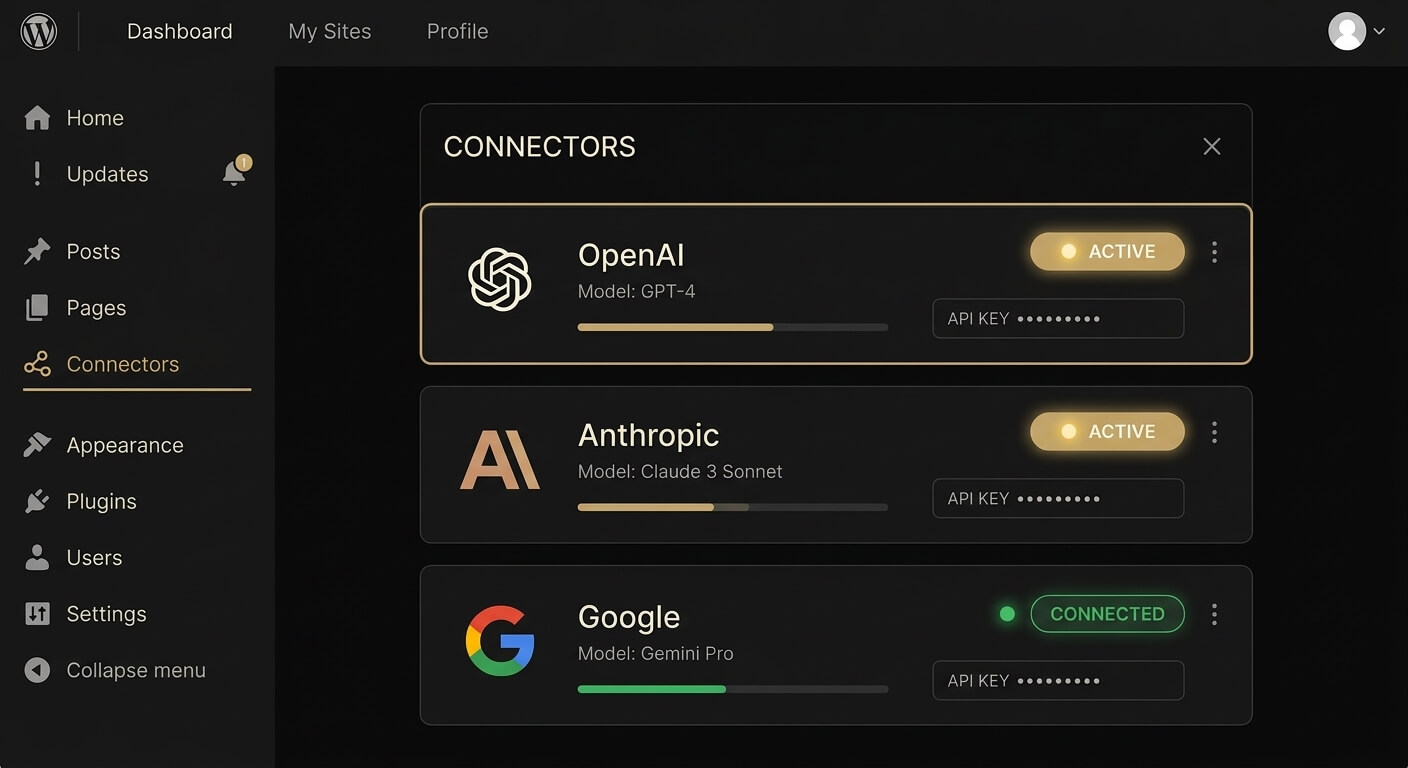
    WordPress 7.0 Connectors Dashboard showing AI provider connections for OpenAI, Anthropic, and Google integrated into the WordPress admin

    The AI Client SDK is a JavaScript API accessed through wp.aiClient. It provides a standardized interface for integrating any AI provider. OpenAI, Anthropic, Google. One API, any provider. It works directly within the WordPress editor and admin.

    The Connectors Dashboard lives in Settings > Connectors in wp-admin. It lets site owners manage external AI connections from a central interface. Add, remove, and configure AI provider connections without touching code.

    The Abilities API lets plugins and themes declare their capabilities to AI assistants. When an AI agent interacts with a WordPress 7.0 site, it can discover what the site can do. It sees capabilities beyond static content.

    No other major CMS offers this. Not Webflow. Not Squarespace. Not Wix. WordPress 7.0 is AI-native at the platform level.

    Why WordPress Is the Best Platform for AI-Native Websites

    WordPress powers 43% of all websites on the internet as of March 2026, according to W3Techs. That is 8 times more than Shopify, the second-largest CMS, at around 5%.

    But market share alone does not make WordPress the right choice. Here is what it does.

    Server-side rendered by default. WordPress generates HTML on the server. AI crawlers can read every page without executing JavaScript.

    Gutenberg block architecture. WordPress 7.0’s Full Site Editing system produces clean, semantic HTML output. No page builder bloat. No shortcode soup. Block patterns give you complete control over content structure.

    The plugin ecosystem. Over 59,000 free plugins in the WordPress.org directory. Schema plugins, caching plugins, IndexNow plugins. Whatever your AI-native website needs, there is a WordPress solution.

    WordPress 7.0’s native AI capabilities. The AI Client SDK, Connectors Dashboard, and Abilities API are built into the core. Webflow has no equivalent. Squarespace has no equivalent. Wix has no equivalent. If you want a CMS that treats AI integration as a first-class feature, WordPress 7.0 is the only serious option.

    I have evaluated every major CMS over my career. For an AI-native company website in 2026, the answer is WordPress. Nothing else comes close.

    What Suzaku Productions Builds

    Suzaku Productions has been building WordPress websites from Bangkok since 2014. After 12 years and more than 100 projects, we made a deliberate choice in 2026. We specialize exclusively in AI-native WordPress development.

    We build company websites on WordPress 7.0 that are designed from day one to be cited by AI platforms. Our process covers every building block in this guide. Answer-first content architecture. Comprehensive JSON-LD structured data. AI crawler configuration. Entity optimization. Full WordPress 7.0 AI Client SDK activation.

    Our own website, suzakuproductions.com, is built on these exact principles. It is the proof of concept we deliver to every client.

    A typical AI-native company website project takes 4 to 8 weeks from planning to launch. We handle the architecture, the technical implementation, and the content structuring. You get a website that works for your visitors and for the AI systems they use to find you.

    If you are planning a website rebuild in 2026, building AI-native is not a feature upgrade. It is the foundation.

    Book a discovery call and we will audit your current AI visibility for free.

    Frequently Asked Questions

    How long does it take to build an AI-native company website on WordPress?

    A focused company website with 5 to 10 pages typically takes 4 to 6 weeks. That covers architecture planning through launch. Larger projects with custom AI integrations or multi-language requirements may need 6 to 8 weeks. The timeline depends on content volume and entity relationship complexity.

    What does an AI-native company website cost?

    Pricing depends on scope. A focused company website with core pages typically starts at THB 120,000 to THB 330,000. Enterprise sites with custom WordPress 7.0 AI integrations and multi-language support are priced on a project basis. The investment reflects the dual optimization required. You are building for human visitors and AI systems at the same time.

    Can I convert my existing WordPress website to AI-native?

    Yes. Suzaku Productions audits your current site and identifies structural gaps in AI visibility. We then implement AI-native architecture through technical optimization and content restructuring. Sometimes, a full rebuild on WordPress 7.0 is more efficient than retrofitting. This is especially true if your current theme uses client-side JavaScript rendering that blocks AI crawlers.

    Will AI-native development hurt my Google rankings?

    The opposite. Semantic HTML, structured data, clear content hierarchy, and fast load times are all Google SEO best practices. They are also the core of AI-native development. Semrush’s research found 86% domain overlap between AI Overview citations and Google’s top 10 organic results. Strong SEO and AI-native architecture reinforce each other. You are not choosing between Google and AI. You are building for both.

    Why WordPress instead of Webflow or Squarespace for an AI-native website?

    WordPress 7.0 is the first major CMS with native AI infrastructure built into the core. The AI Client SDK, Connectors Dashboard, and Abilities API have no equivalent on Webflow, Squarespace, or Wix. WordPress also renders server-side by default. This matters because AI crawlers from OpenAI and Anthropic cannot execute JavaScript. With 43% global market share and over 59,000 plugins, WordPress provides flexibility and ecosystem support that closed platforms cannot match.


    Author: Kevin Pantanella, Founder, Suzaku Productions

    Last Updated: March 31, 2026
  • What Is AI-Native WordPress Development? A 2026 Guide

    What Is AI-Native WordPress Development? A 2026 Guide

    AI-native WordPress development builds WordPress websites that AI systems can read, understand, and cite. These AI systems include ChatGPT, Gemini, Perplexity, and Claude. The approach treats AI crawlers and large language models as a second audience. That audience is equal in priority to human visitors.

    After 12 years of building WordPress sites, I can tell you this is the biggest shift I have seen. Bigger than the block editor. Bigger than Full Site Editing. WordPress 7.0 launches April 9, 2026. It makes AI-native development possible at the platform level for the first time. And most agencies still don’t know how to do it.

    Here is what it means, why it matters, and how it works.

    Why AI-Native Development Matters Right Now

    The way people discover businesses online is splitting into two. Google search is no longer the only channel. ChatGPT alone processes over 2.5 billion queries daily. Google AI Overviews now appear in roughly 30% of U.S. desktop searches. Perplexity handles 200 million daily queries with its own index of over 200 billion URLs.

    These AI platforms do not show a list of links. They synthesize answers and cite specific sources. If their crawlers cannot read your WordPress site, you are invisible. If your content is locked inside JavaScript that AI bots cannot render, the same result. You lose this entire discovery channel.

    The numbers tell the story. Gartner projects a 25% decline in traditional search engine volume by 2026. Zero-click searches now dominate Google. Users get their answer without clicking on any results. These searches rose from 56% in 2024 to 69% in 2025.

    Ahrefs found that 80% of pages cited by large language models do not rank in Google’s top 100. That stat changed my thinking. Ranking on Google does not guarantee you will appear in AI answers. You need specific architectural decisions built into your WordPress site. That is what AI-native development delivers.

    How AI-Native Differs from Traditional WordPress Development

    Traditional and AI-native WordPress development produce different outcomes. They optimize for different systems. Here is a concrete breakdown.

    Comparison diagram showing traditional WordPress development versus AI-native WordPress development approaches

    Traditional WordPress Development

    Traditional WordPress development focuses on human visitors and Google. The typical approach uses page builders like Elementor or Divi for visual design. It relies on keyword-targeted content and plugins for SEO metadata. Google is the primary discovery channel.

    A ZipTie.dev audit of over 500 websites found the problem. GPTBot and ClaudeBot have limited JavaScript rendering. Sites relying on client-side JavaScript are invisible to two of the four major AI crawlers. Most page builders output JavaScript-dependent layouts.

    AI-Native WordPress Development

    AI-native WordPress development keeps everything that works about the traditional approach. It adds a second layer. Every architectural decision accounts for both human visitors and AI systems.

    The core differences are clear. Server-side rendered HTML instead of client-side JavaScript. Semantic HTML5 elements instead of generic div wrappers. JSON-LD structured data feeding Google’s Knowledge Graph. Content structured in self-contained passages of 200 to 500 tokens. Each passage is citable without surrounding context. AI crawler access is configured in robots.txt for GPTBot, ClaudeBot, PerplexityBot, and OAI-SearchBot.

    The discovery model changes, too. Traditional WordPress targets one platform: Google. AI-native WordPress targets five. Those five are Google organic, Google AI Overviews, ChatGPT, Perplexity, and Claude. Each uses a different retrieval system. Only 11% of domains are cited by both ChatGPT and Perplexity. Optimizing for one does not guarantee visibility on the other.

    The Five Technical Pillars of AI-Native WordPress

    AI-native WordPress rests on five technical pillars. Each one addresses a specific requirement for AI crawling, processing, and citation.

    The five technical pillars of AI-native WordPress: server-side rendering, semantic HTML5, JSON-LD structured data, passage-level content optimization, and AI crawler accessibility

    1. Server-Side Rendering

    Server-side rendering is the single most important technical requirement. GPTBot, ClaudeBot, and PerplexityBot do not execute JavaScript. If your WordPress theme renders content on the client side, AI crawlers see an empty page.

    WordPress’s native Gutenberg block editor outputs server-side HTML by default. AI-native developers use Gutenberg blocks instead of page builders. No Elementor. No Divi. No WPBakery. Clean, server-rendered HTML that every AI crawler can read.

    I learned this the hard way on a client project in 2024. The site ranked well on Google but was absent from ChatGPT responses. The culprit: an Elementor-built layout that relied on JavaScript rendering. We rebuilt it with native blocks. The site started appearing in AI citations within weeks.

    2. Semantic HTML5 Structure

    AI systems parse HTML to understand what content means. Semantic HTML5 elements give them that context. An <article> tag tells the AI this is a self-contained piece. A <main> tag identifies the primary content area. A <time> element signals when content was published or updated.

    WordPress Gutenberg outputs semantic HTML by default. That is another advantage of staying within the native block ecosystem.

    3. JSON-LD Structured Data

    JSON-LD structured data is how your WordPress site talks to AI systems. It uses a machine-readable format. Google and Microsoft both confirmed in March 2025 that they use Schema Markup for generative AI features.

    Schema App reported a 19.72% increase in Google AI Overview visibility. The increase came after implementing entity-linking structured data.

    For an AI-native WordPress site, required schema types include Organization, Person, Service, Article, and FAQPage. At Suzaku Productions, we implement JSON-LD schema on every page during the build.

    4. Passage-Level Content Optimization

    Large language models do not read entire pages. They extract passage-level chunks of about 200 to 500 tokens. The Princeton GEO research paper was published at ACM KDD 2024. It tested 10,000 queries. Content with clear Q&A formatting is 40% more likely to be cited by AI systems. Adding statistics improved visibility by 22%. Adding expert quotations improved it by 37%.

    What does this mean for WordPress content? Every H2 section should start with a direct answer in the first 40 to 60 words. Paragraphs should avoid pronouns that reference earlier content. Each section must make sense on its own. It should work even when pulled out of context for an AI response. Technical terms need inline definitions. Stats need named sources.

    Writing this way feels different from what most WordPress sites follow. But AI systems can extract and cite this kind of content. They ignore sites that are not built for it.

    5. AI Crawler Accessibility

    An AI-native WordPress site allows AI crawlers in its robots.txt file. The list includes GPTBot, ClaudeBot, PerplexityBot, OAI-SearchBot, Claude-SearchBot, and Google-Extended. Many WordPress sites block these crawlers by default; poorly configured security plugins are to blame.

    In addition to robots.txt, AI-native sites include an llms.txt file at the domain root. The specification is still debated. We treat it as a low-effort addition worth implementing. Semrush tested it and saw minimal impact. Mintlify co-developed llms-full.txt with Anthropic. Their data showed more positive results.

    The IndexNow protocol is also part of the stack. IndexNow sends instant indexing notifications to Bing. Bing powers ChatGPT’s search backend. According to Wellows’ analysis, sites with properly configured IndexNow see AI citations appear 3 to 4 weeks faster.

    How WordPress 7.0 Changes Everything

    WordPress 7.0 releases on April 9, 2026, during WordCamp Asia. It is the first major CMS to build AI infrastructure directly into its core. Not a plugin. WordPress is becoming an AI-native platform.

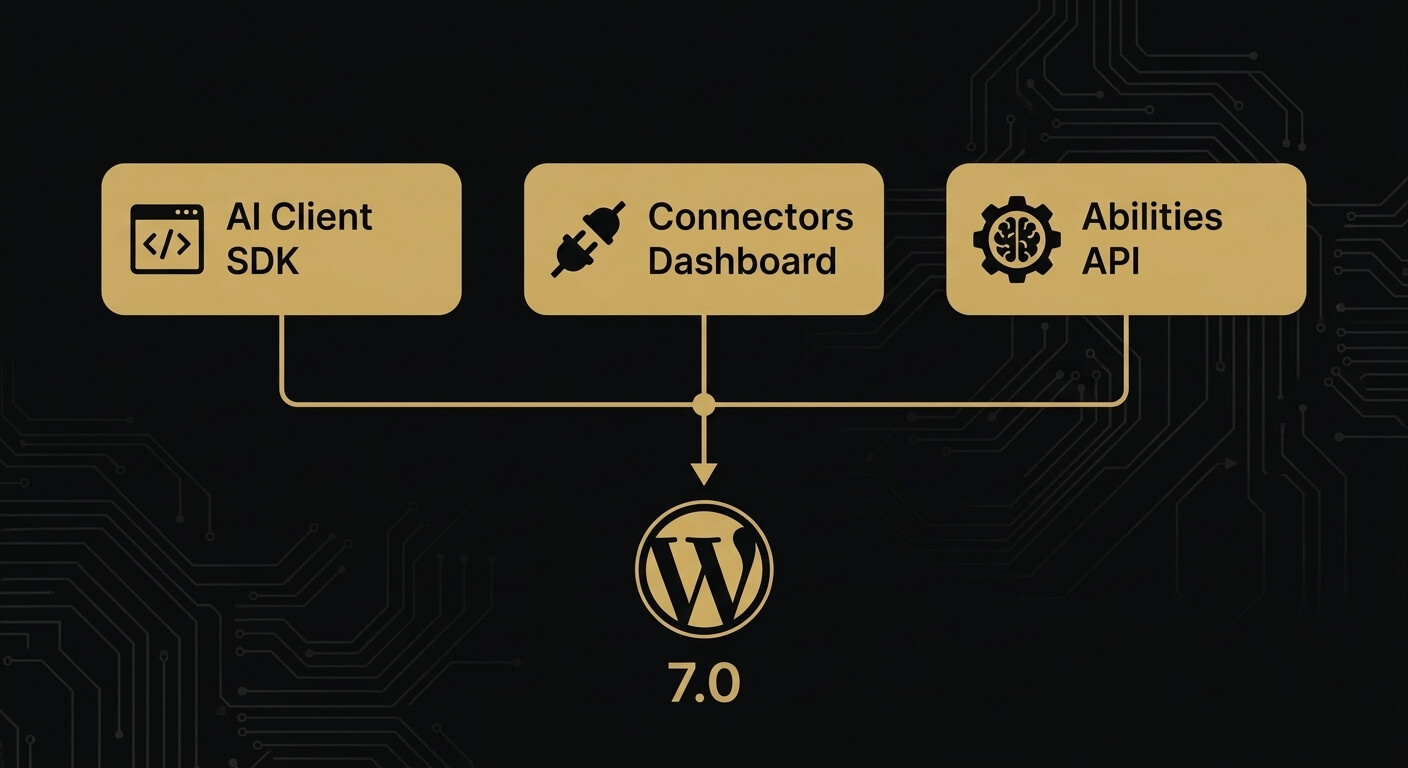
    WordPress 7.0 AI features diagram showing AI Client SDK, Connectors Dashboard, and Abilities API

    Three features matter for AI-native development.

    The AI Client SDK. WordPress 7.0 introduces a core-level JavaScript API called wp.aiClient. It allows plugins and themes to integrate any AI model from any provider. OpenAI, Anthropic, Google, or any supported service. This standardizes how WordPress communicates with AI. It replaces the fragmented plugin-by-plugin approach.

    The Connectors Dashboard. A new screen under Settings > Connectors in wp-admin manages AI provider connections. Site owners can add, remove, and switch between AI providers without modifying code. The AI Connectors Screen was added in RC1 as a supporting requirement for the release.

    The Abilities API. Plugins and themes can declare their capabilities to AI assistants. When an AI agent interacts with a WordPress 7.0 site, it can discover what the site can do. It sees capabilities beyond static content. WordPress becomes an active participant in the AI ecosystem.

    WordPress 7.0 also introduces real-time multi-user collaboration. It ships a redesigned admin interface with DataViews. A Command Palette is accessible via Cmd+K or Ctrl+K. The release has been in testing since Beta 1 on February 20, 2026. RC2 landed March 27, 2026.

    WordPress powers approximately 42.6% of all websites according to W3Techs. When the most-used CMS ships native AI capabilities, every WordPress agency needs to understand what changed. Read our full breakdown in WordPress 7.0: Everything Your Business Needs to Know Before April 9.

    Who Needs AI-Native WordPress Development

    Any business that depends on being found online needs this. AI search is growing fast. Some categories benefit more than others.

    B2B companies. Procurement managers and executives now use ChatGPT and Perplexity alongside Google. Seer Interactive’s B2B benchmarks show ChatGPT referral conversion rates of 15.9%. Google organic converts at 1.76%. That is a 9x conversion premium. B2B companies that appear in AI answers capture higher-intent traffic.

    Professional services firms. Consulting, legal, accounting, and agency businesses depend on expertise to win clients. AI systems evaluate trust signals through structured data, author credentials, and content depth. An AI-native site makes these signals explicit and machine-readable.

    Content-heavy websites. Media companies, publishers, and brands with large content libraries have the most to gain. Each piece of content is a potential citation source for AI systems. But it must be structured for extraction.

    E-commerce businesses. AI is beginning to make direct product recommendations. OpenAI’s Agentic Commerce Protocol and ChatGPT Shopping features are changing how consumers find products. WooCommerce powers over 20% of all WordPress sites. These sites need product data that AI agents can parse and act on.

    Anyone competing in high-value markets. If your competitors appear in AI-generated answers and you do not, you lose. That channel converts at 4.4x the rate of traditional organic search.

    What Suzaku Productions Does Differently

    Suzaku Productions is a Bangkok-based WordPress agency. We have been building WordPress sites since 2014. In 2026, we made a deliberate choice: specialize exclusively in AI-native WordPress development.

    Here is what that means in practice. We do not use page builders. Every site runs on Gutenberg-native blocks with clean, server-rendered HTML. We implement JSON-LD structured data across every page during the build. We configure AI crawler access from day one. We structure content at the passage level for AI extraction. We build on WordPress 7.0 with the AI Client SDK activated. We have been testing every RC build since February. We know this platform because we have spent 12 years on it.

    Looking for an agency that understands both WordPress and AI search? Book a discovery call or explore our AI-Native Company Website service. You can also learn more about the WordPress 7.0 migration process.

    Frequently Asked Questions

    Is AI-native WordPress development the same as GEO (Generative Engine Optimization)?

    GEO is the broader discipline. It covers optimizing content for AI-generated search results on any platform. AI-native WordPress development is GEO applied specifically to WordPress. It takes full advantage of WordPress 7.0’s native AI capabilities. GEO works on any CMS. AI-native WordPress development is WordPress-specific. It includes block-based architecture, server-side rendering, and activation of the AI Client SDK.

    Do I need WordPress 7.0 for AI-native development?

    Many AI-native principles work on earlier WordPress versions. Server-side rendering, semantic HTML, structured data, and AI crawler configuration all apply. But WordPress 7.0 adds native AI integration through the AI Client SDK, Connectors dashboard, and Abilities API. No plugin can replicate these. If you are running an older version, consider the WordPress 7.0 migration as your first step.

    How long does it take to build an AI-native WordPress site?

    A typical AI-native WordPress website takes 4 to 8 weeks. A focused company site with 5 to 10 pages can be completed in 4 weeks. Larger projects with custom AI integrations may take 6 to 8 weeks.

    How much does AI-native WordPress development cost?

    Pricing depends on scope. A focused AI-native company website with core pages and blog typically ranges from THB 120,000 to THB 330,000. Enterprise projects with multi-language support or custom AI integrations are priced individually. Contact us for an estimate.

    Can I convert my existing WordPress site to AI-native?

    Yes. Suzaku Productions audits existing WordPress sites and identifies structural gaps. We implement AI-native architecture through technical optimization and content restructuring. The process covers server-side rendering, structured data, passage-level content formatting, and AI crawler configuration. Sometimes, a full rebuild on WordPress 7.0 is more efficient than retrofitting. Read more in our guide to building an AI-native company website on WordPress.


    Author: Kevin Pantanella, Founder, Suzaku Productions. Bangkok-based WordPress AI-Native Expert since 2014.

    Last Updated: March 31, 2026

  • WordPress 7.0: Everything Your Business Needs to Know Before April 9

    WordPress 7.0: Everything Your Business Needs to Know Before April 9

    WordPress 7.0 launches on April 9, 2026, during WordCamp Asia. It ships with a native AI Client SDK, real-time collaboration, a rebuilt admin interface, and client-side media processing. WordPress had a turbulent 2025 with only two major releases due to the WP Engine legal dispute. Now it returns to full speed with the biggest platform update since the block editor arrived in 2018.

    I have been following the WordPress 7.0 development cycle since the first beta dropped on February 20. Six betas and two release candidates later (RC2 shipped March 27), one thing is clear. This is not a routine version bump. WordPress 7.0 changes what your website can do at the infrastructure level. And most businesses are not ready for it.

    Here is what each major feature means for your company. What could go wrong if you rush the upgrade? And exactly what you should do in the next 10 days.

    What’s New in WordPress 7.0: The Big Picture

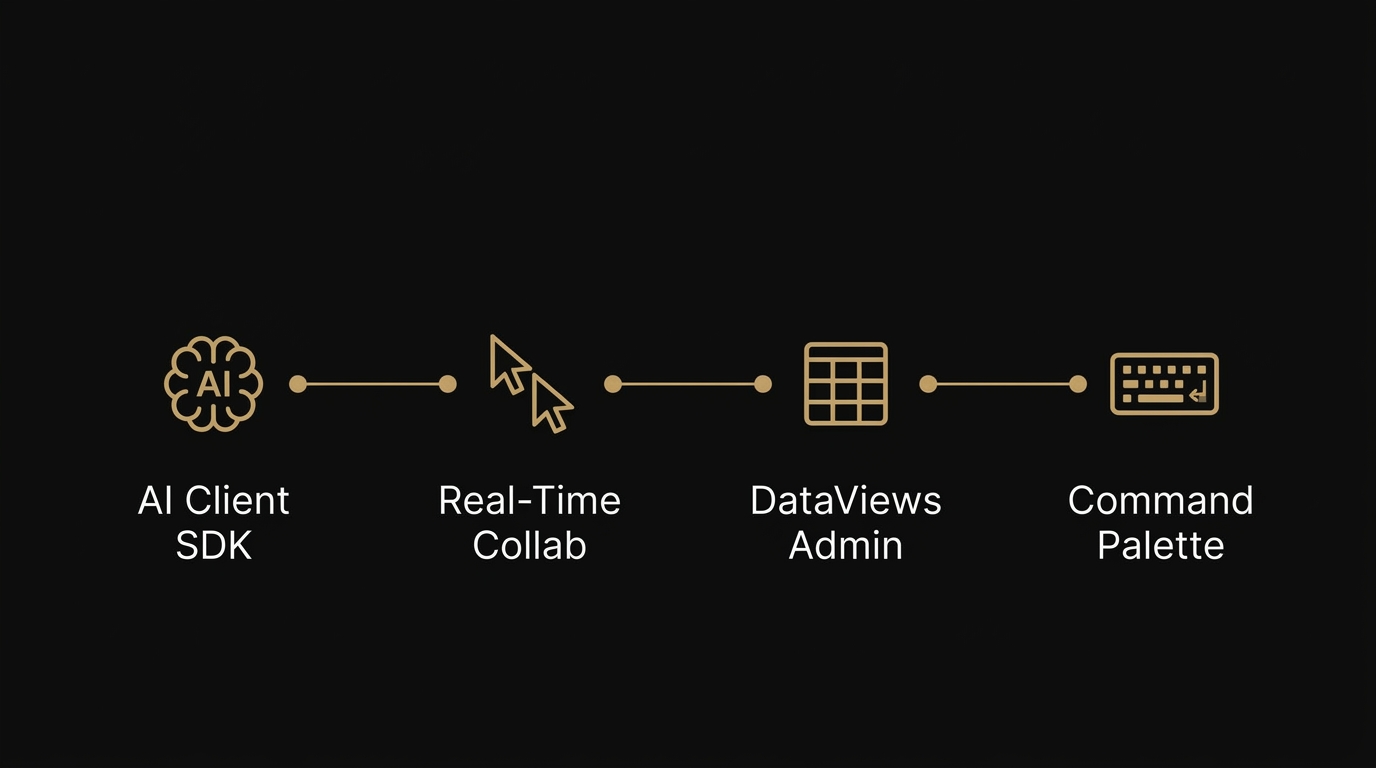
    WordPress 7.0 key features: AI Client SDK, Real-Time Collaboration, DataViews Admin, and Command Palette

    WordPress 7.0 marks the official launch of Phase 3 of the Gutenberg project, focused on collaboration and workflows. The development timeline tells a story. WordPress shipped only two releases in 2025: version 6.8 in April and 6.9 in December. The WP Engine lawsuit drained Automattic’s contributor capacity and forced the core team to prioritize stability over features. That delay pushed the major version bump into 2026.

    Now the engine is running again. WordPress returns to a three-release cadence. Version 7.0 arrives in April, 7.1 is targeted for August 19, and 7.2 is expected around December 8. According to the Make WordPress Core release schedule, the final general release happens during WordCamp Asia Contributor Day.

    The release lead is Matias Ventura, with tech leads Ella van Durpe and Mukesh Panchal. After six beta cycles and over 400 updates and fixes, the release is on track. WordPress 7.0 RC2 was published on March 27, confirming stability.

    WordPress still powers 43.5% of all websites globally according to W3Techs. When a platform used by nearly half the internet makes a move this big, every business running WordPress needs to pay attention.

    The AI Client SDK: Your Website Talks to AI Now

    WordPress 7.0 introduces the WP AI Client, a core-level JavaScript API (wp.aiClient). It allows plugins and themes to integrate any AI model from any provider. This is infrastructure, not a chatbot plugin. It standardizes how WordPress communicates with AI services at the platform level.

    What does that mean in practice? Three things.

    The Connectors Dashboard lives at Settings > Connectors in wp-admin. Site owners can add connections to OpenAI, Anthropic, Google, or any supported AI provider from a central interface. No code changes needed. Beta 3 expanded this by dynamically registering providers from the WP AI Client registry beyond the three default options.

    The Abilities API lets plugins and themes declare their capabilities so AI assistants can discover and use them. An AI agent interacting with a WordPress 7.0 site can understand what content it contains and what it can do. Content summarization. Intelligent internal search. AI-powered form processing. All running through your own WordPress installation, connected to the provider you choose.

    Why this matters for your business: AI-powered search is growing at a staggering pace. ChatGPT processes over 2.5 billion queries daily. Google AI Overviews appear in roughly 30% of U.S. desktop searches. Gartner projects a 25% decline in traditional search volume by 2026. Generative AI will power 70% of all search traffic by 2028. The AI Client SDK positions WordPress as the first major CMS with native AI capabilities built into the editor. Your competitors using Webflow, Squarespace, or Wix do not have this at the platform level.

    Here is what most agencies will not tell you. The AI Client alone makes WordPress 7.0 the most significant CMS update in years. And the vast majority of WordPress sites are not structured to take advantage of it. If you want your website to be visible to AI systems like ChatGPT, Gemini, Perplexity, and Claude, you need an AI-native WordPress development approach. Flipping the switch on a connector is not enough.

    Real-Time Collaboration: Google Docs Inside WordPress

    WordPress 7.0 brings Google Docs-style real-time co-editing directly into the block editor. Multiple team members can work on the same post or page at the same time. Live cursors show who is editing where. Data syncing works across locations. Offline edits sync automatically when connectivity resumes.

    If you run a content team, you know the pain. Someone drafts in Google Docs. Someone else leaves comments. A third person copies the final version into WordPress and reformats everything. WordPress 7.0 eliminates that entire workflow.

    The Notes feature (introduced in 6.9 and expanded in 7.0) takes this further. You can now leave threaded, block-level comments directly inside the editor. WordPress 7.0 adds fragment-level commenting. You can highlight specific text within a block and comment on that selection alone. No more “check the third paragraph” emails. The feedback lives exactly where it belongs.

    For agencies managing client content, this alone justifies the upgrade. I have spent 12 years watching WordPress evolve from a blogging tool into a full site editor. Real-time collaboration has been the missing piece for teams. Now it ships as core functionality.

    The Admin Gets a Reboot: DataViews and Command Palette

    WordPress 7.0 replaces the legacy admin list tables with DataViews. It works like a modern app for managing posts, pages, users, and plugins. If you have ever felt that WP-Admin looks like it was designed in 2005, that changes on April 9.

    The bigger productivity win is the Command Palette, introduced in Beta 5. Press Cmd+K (Mac) or Ctrl+K (Windows) from anywhere in wp-admin. You get instant access to every tool, setting, and action. Search for a page, jump to settings, toggle a plugin. All from the keyboard.

    DataViews and the Command Palette transform the daily experience for anyone who works in wp-admin. Fewer clicks. Faster navigation. A backend that finally feels like a modern application.

    What You Need to Do Before April 9

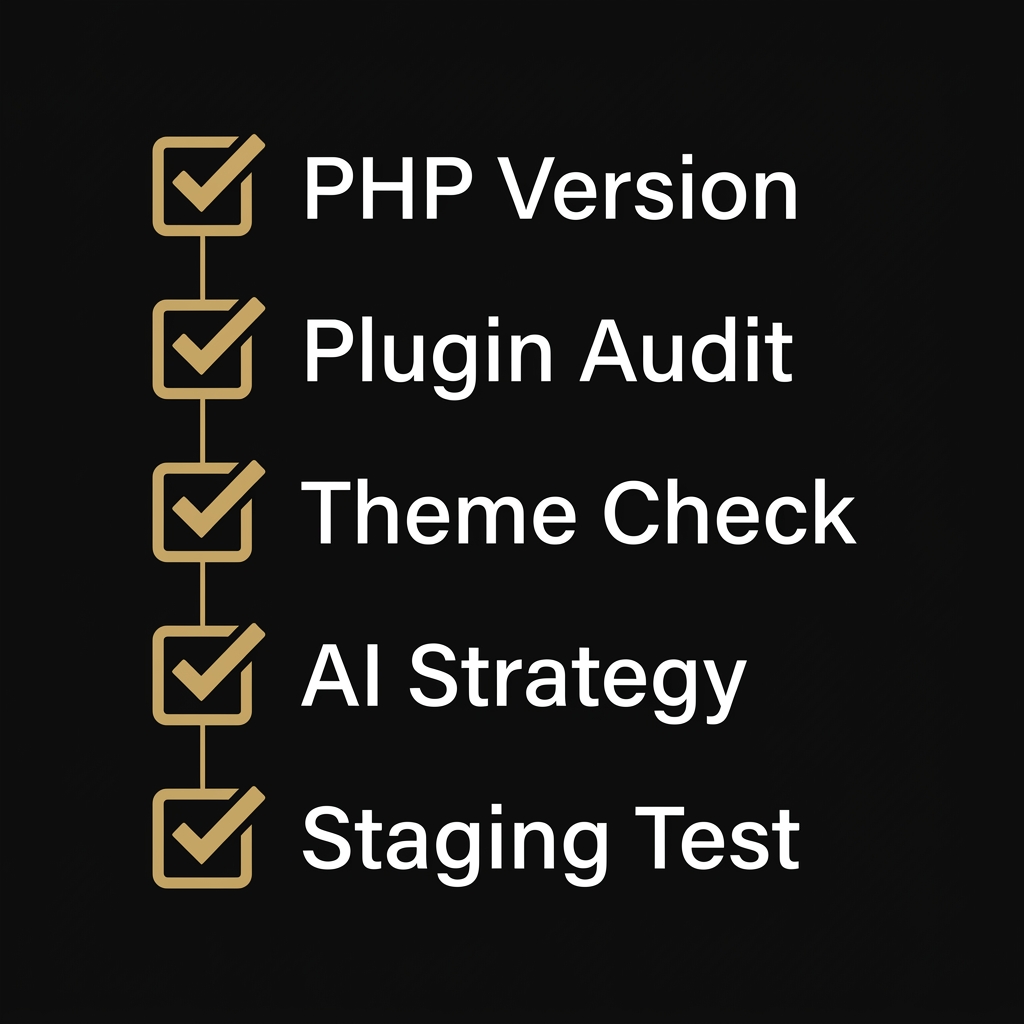
    WordPress 7.0 pre-upgrade checklist: PHP version, plugin audit, theme check, AI strategy, staging test

    Every WordPress site owner should take these five steps before upgrade day. Rushing this upgrade without preparation is how sites break.

    1. Check your PHP version. WordPress 7.0 requires PHP 7.4 minimum. PHP 8.3 or higher is strongly recommended. Contact your hosting provider if you are running an older version. This release drops support for PHP 7.2 and 7.3.

    2. Audit your plugins. Test every active plugin against WordPress 7.0 RC2. The WordPress Playground provides a zero-risk browser-based testing environment. Pay close attention to page builders and any plugin that modifies the editor experience.

    I manage WordPress sites for a few white-label clients. Some of these sites run page builders and plugin stacks that were never tested against WordPress 7.0. If those clients hit the update button on April 9 without checking compatibility first, their entire frontend goes dark. Check every builder dependency, every custom plugin, every theme hook before you touch that button on a production site. After 12 years of WordPress work, I can tell you this. The sites that break on major updates are always the ones where nobody tested first.

    3. Evaluate your theme. Classic themes will continue to function. Block themes (Full Site Editing themes) get full access to WordPress 7.0 features, including real-time collaboration and AI integration. If your theme is more than two years old, consider upgrading. Our own Suzaku site currently runs on WordPress 6.9.4. We are planning our migration path to 7.0 with full compatibility testing before we make the jump.

    4. Plan your AI strategy. The Connectors dashboard lets you connect to AI providers immediately after the upgrade. Decide now which AI services you want to integrate: content generation, search enhancement, customer interaction, or internal workflow automation. Do not figure this out after the fact.

    5. Use a staging environment. Do not upgrade production on day one without testing. Clone your site. Run your critical workflows. Verify every form, every plugin, every custom function. Then deploy. Our WordPress 7 migration service exists because this step requires expertise that most in-house teams do not have yet.

    Who Should Care Most About WordPress 7.0

    Every WordPress site benefits from this update. Some businesses stand to gain (or lose) significantly more than others.

    B2B companies where clients research solutions online before making contact. When a procurement manager asks ChatGPT for vendor recommendations, your site needs to be structured so AI systems can find and cite your content. WordPress 7.0’s AI Client SDK makes this possible at the platform level for the first time.

    Companies with content teams. Real-time collaboration eliminates the Google Docs round-trip. If you publish regularly and multiple people touch your content, WordPress 7.0 pays for itself in saved time within weeks.

    Businesses running page builders or heavy plugin stacks. You are the most at risk. The larger your plugin dependency chain, the more likely something breaks on upgrade. If an agency manages your WordPress site, ask them now: have you tested our site against WordPress 7.0? If they have not, or if they do not know what the AI Client SDK is, you may need a migration specialist who has followed this release cycle from day one.

    Any organization that depends on online visibility for revenue. Zero-click searches rose from 56% to 69% between 2024 and 2025, according to SparkToro. AI-powered search is rewriting how people discover businesses. Schema App research shows a 19.72% increase in AI Overview visibility after implementing comprehensive structured data. WordPress 7.0 gives you the tools to build an AI-native company website that is visible on Google and across every major AI platform.

    Frequently Asked Questions

    Is WordPress 7.0 safe to install on launch day?

    WordPress 7.0 is a stable general release, not a beta. The development cycle included six betas and two release candidates with hundreds of fixes. That said, always test on a staging environment first. Some plugins and themes may need updates for full compatibility. The risk is not WordPress core. The risk is your specific plugin and theme combination.

    Will WordPress 7.0 break my existing site?

    WordPress has strong backward compatibility. Your existing content and most plugins will continue to work. The main risks are themes relying on deprecated functions or plugins that conflict with the new editor. A pre-migration audit eliminates these risks before they become problems.

    Do I need an agency for WordPress 7 migration?

    The core update itself is simple. But activating the AI Client SDK, restructuring your theme, configuring connectors, and avoiding downtime? That takes WordPress 7.0 expertise. Most agencies have not tested the betas because the platform has not shipped yet. We have been tracking every release since February.

    What is the AI Client SDK and do I need it?

    The AI Client SDK (wp.aiClient) is a JavaScript API built into WordPress 7.0 core. It lets plugins and themes integrate any AI provider through a standardized interface. You do not need to use it on day one. But if you plan to add AI-powered content workflows, search enhancement, or AI agent integration, the SDK provides the foundation. Ignoring it means missing the biggest platform capability WordPress has added in years.

    What PHP version does WordPress 7.0 require?

    WordPress 7.0 requires PHP 7.4 minimum. PHP 8.3 or higher is strongly recommended for best performance and security. Support for PHP 7.2 and 7.3 has officially been dropped. Check your PHP version with your hosting provider before upgrading.


    About the Author
    Kevin Pantanella is the founder of Suzaku Productions, a Bangkok-based WordPress agency specializing in AI-native WordPress development. With over 12 years of WordPress experience, Kevin helps businesses across Thailand, Singapore, Hong Kong, and Europe build websites designed for both human visitors and AI systems.

    Last Updated: March 31, 2026